
Open-Loop Manual Mode: Spinning a Motor with Potentiometers
Introduction
You can spin a 3-phase motor in under 5 minutes with two potentiometers and no code. No PC, no calibration, no commissioning run. That is the appeal of open-loop manual mode: you wire a few signals, turn a knob, and the motor moves.
This guide shows you when open-loop motor control is enough, how to wire it, and where it falls short. If you only need to confirm a motor turns, set a rough speed, or run a quick bench test, open loop gets you there fast. If you need precise torque or position, you will want closed loop instead, and we point you there too.
What Open-Loop Mode Is (and Its Limits)
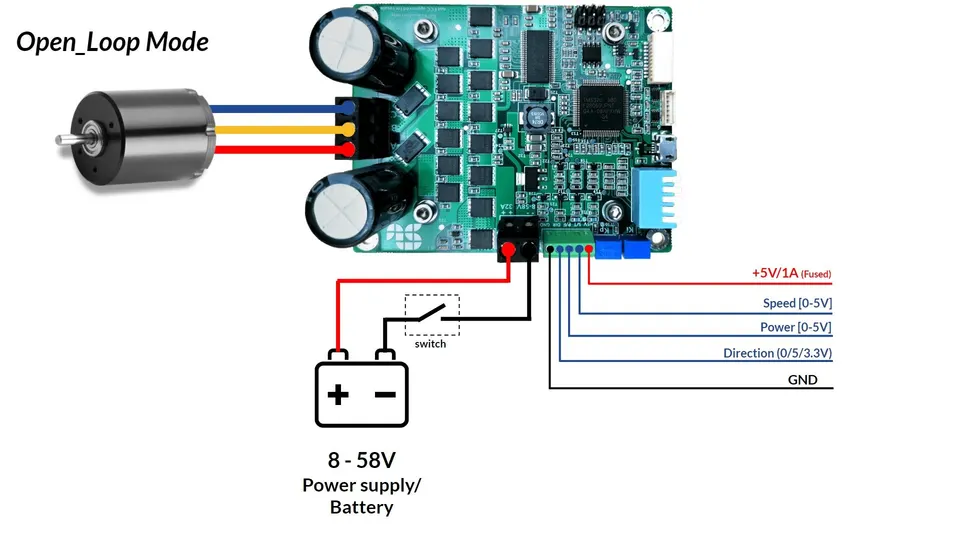
In open-loop mode, the controller drives the motor without reading any feedback. There is no encoder, no Hall sensor, and no current measurement closing the loop back to the controller. You set a command, like a voltage level or a speed reference, and the controller applies it. The motor responds, but the controller never checks whether the result matched what you asked.
That is the key trade-off. Without feedback, the controller cannot correct error. So open-loop control gives you no precise torque and no precise position. Speed holds only roughly, and it drifts when the load changes. Push more load on the shaft and the motor slows or stalls, because nothing is watching to compensate.
Open loop is still useful in plenty of cases:
- Quick bench checks: confirm wiring, rotation, and direction without a full setup.
- Simple fixed-speed jobs: a fan, a pump, or a conveyor that does not need tight control.
- First power-up: spin a new motor to make sure it runs before you commission it.
The limits matter most at low speed. With no feedback, commutation timing is open, so the motor can run rough or cog near zero RPM. For smooth low-speed torque, accurate positioning, or stall protection, you need feedback and a closed loop. We compare the two paths in detail in closed loop vs open loop.
Takeaway: open loop is fast and simple, but it trades away precise torque, position, and low-speed smoothness.
Wiring for Manual Mode
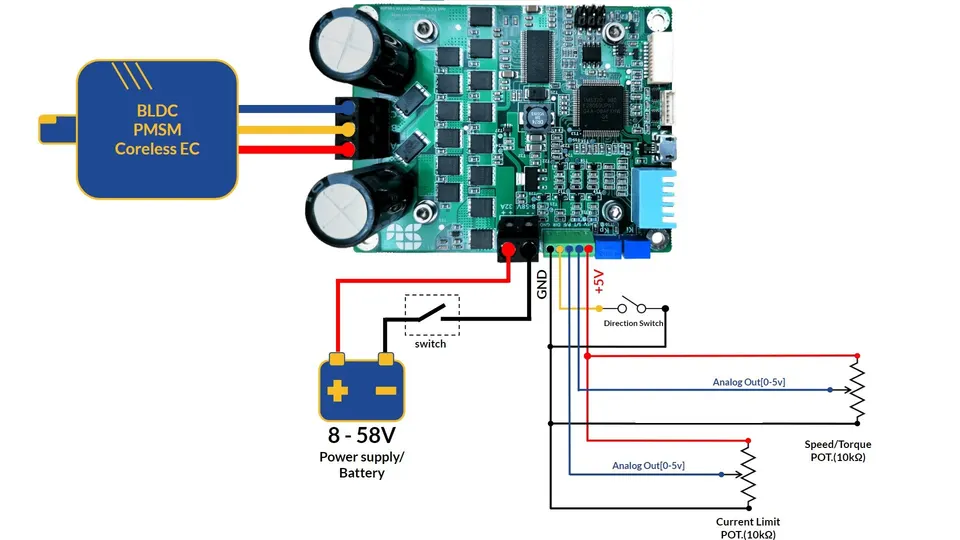
Manual mode runs standalone, with no PC in the loop. You drive the controller with analog inputs instead of software commands. The minimum setup is two potentiometers and a direction switch wired to the analog input header.
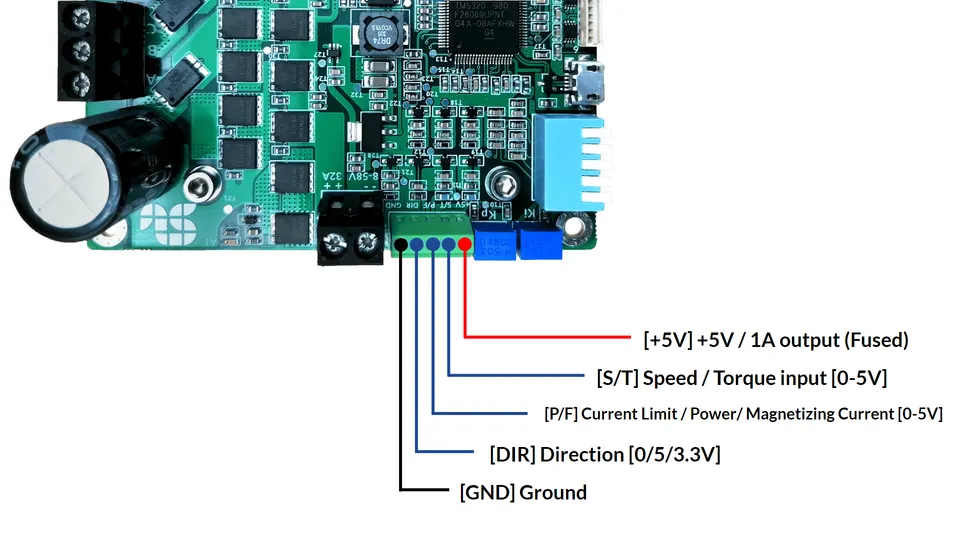
The analog input connector carries the pins you need. The important one for manual speed is the S/T pin (Speed or Torque reference), which reads the wiper of your speed potentiometer. The pins break down like this:
| Pin | Function | Wired to |
|---|---|---|
| 5V | Reference supply for the pots | Both potentiometer top rails |
| S/T | Speed or torque reference (analog) | Speed potentiometer wiper |
| P/F | Position or second analog reference | Optional second potentiometer |
| DIR | Direction select | Direction switch |
| GND | Common ground | Potentiometer bottom rails and switch |
Wire the 5V and GND pins to the outer legs of the potentiometer, and the wiper to S/T. The DIR pin reads a simple switch that sets rotation direction. That is the whole manual interface. No firmware, no terminal session, no calibration.
One detail to get right first: set the controller to open-loop mode and the correct motor type using the onboard DIP switches before you power up. The mode and motor-type switches tell the controller how to drive the phases. Get those wrong and the motor will not spin correctly, no matter how clean your wiring is.
Takeaway: two pots, a direction switch, the S/T pin, and the right DIP switch settings are all you need for manual mode.
Spinning the Motor
With the wiring done and the DIP switches set, power up the supply. The motor should sit still while the speed potentiometer is at zero.
Turn the speed potentiometer slowly. As the voltage on the S/T pin rises, the controller raises the command and the motor starts to turn. Keep turning to increase speed, turn back to slow down. The response is direct: knob position maps to command level. Because this is open loop, the actual RPM also depends on the load, so the same knob position can give a slightly different speed under a heavier shaft load.
To reverse rotation, flip the direction switch on the DIR pin. Bring the speed back toward zero before you change direction so you do not slam the motor from full speed one way to full speed the other.
A few things to expect:
- Smooth at mid and high speed, where open-loop commutation is stable.
- Rougher near zero RPM, where the lack of feedback shows most.
- Speed sags under load, since nothing compensates for the extra torque demand.
For a full walkthrough of driving a 3-phase motor by hand this way, see control the speed of a 3-phase motor manually in open-loop mode.
Takeaway: the speed pot sets the command and the DIR switch sets rotation, with speed varying as the load changes.
When to Use Open Loop vs Closed Loop
The choice comes down to how much precision your job needs. Open loop wins on speed of setup. Closed loop wins on accuracy and protection.
| Open loop (manual) | Closed loop | |
|---|---|---|
| Feedback | None | Encoder, Hall, or sensorless |
| Setup time | Minutes, no PC | Commissioning required |
| Speed accuracy | Rough, drifts with load | Held to reference |
| Torque control | No | Yes |
| Position control | No | Yes |
| Low-speed smoothness | Limited | Good |
| Best for | Quick tests, simple fixed-speed runs | Precise, repeatable, protected motion |
Reach for open loop when you want to spin a motor fast, check direction, or run a simple fixed-speed load that does not change much. Reach for closed loop when you need the motor to hit a target speed or position, hold torque, or run smoothly at low speed. Closed loop also brings stall and over-current protection that open loop cannot offer.
Moving to closed loop means connecting feedback and running a one-time commissioning to identify and calibrate the motor. That step is what unlocks accurate, repeatable control. For the full comparison of what each mode can and cannot do, read closed loop vs open loop.
Takeaway: open loop for fast and simple, closed loop for precise and protected.
How SOLO Supports Open-Loop Manual Control
SOLO controllers support open-loop manual mode out of the box. You can wire potentiometers to the analog inputs and drive a DC, BLDC, PMSM, or AC induction motor standalone, with no PC and no programming. The DIP switches let you select open-loop mode and motor type on the hardware itself, so a bench check takes minutes.
When you are ready for more control, the same hardware moves to closed loop. The SOLO Motion Terminal software handles commissioning, tuning, and live monitoring, so you can graduate from a quick manual spin to precise speed, torque, or position control on the same controller. You can explore the workflow on the SOLO Motion Terminal page.
Conclusion
Open-loop manual mode is the fastest way to get a motor turning. Wire two potentiometers and a direction switch to the analog inputs, set the DIP switches to open-loop mode and the right motor type, then turn the knob. It is ideal for quick bench tests, direction checks, and simple fixed-speed jobs. The catch is precision: with no feedback, you get no accurate torque or position, speed drifts under load, and low-speed running can feel rough. When your application needs that accuracy, move to closed loop with the SOLO Motion Terminal and a one-time commissioning.
FAQ
Can I control torque in open-loop mode?
Not precisely. In open-loop mode the controller has no current or position feedback, so it cannot regulate torque to a target. You can set a command that influences how hard the motor pushes, but the actual torque varies with speed and load. For accurate, repeatable torque control you need closed loop with current feedback.
Why is my motor rough at low speed in open loop?
Because there is no feedback to correct commutation timing. Near zero RPM, small timing errors have the biggest effect, so the motor can cog, vibrate, or run unevenly. This is normal for open-loop control. Closed-loop mode with an encoder, Hall sensors, or a sensorless observer smooths out low-speed running.
Do I need Motion Terminal for manual mode?
No. Manual open-loop mode runs standalone with potentiometers and DIP switches, so no PC or software is required to spin the motor. You only need the Motion Terminal when you want to commission, tune, or monitor the motor, which is the step into closed-loop control.
Related articles
Stall Detection and Motor Protection Setup on SOLO
Set up stall detection and motor protection on SOLO: configure the stall time, current and fault response to protect your motor from a locked rotor.
PWM Frequency Selection for Low-Inductance Motors
How to choose the PWM switching frequency on SOLO, why low-inductance motors need a higher frequency, and the trade-offs with heat and ripple.
Analog vs Digital Mode on SOLO: When to Use Which
Analog or digital command mode on SOLO? Compare analog inputs vs UART, USB and CAN control to pick the right command interface for your project.
