
Stall Detection and Motor Protection Setup on SOLO
Introduction
A locked rotor under full torque can heat a motor winding past its insulation limit in just a few seconds. The current jumps to the limit, the rotor does not turn, and all that energy turns into heat in one spot. Motor stall detection is the feature that catches this and stops the drive before the damage is done.
This guide shows you what stall detection does, how SOLO decides a motor is stalled, and how to set it up in Motion Terminal without tripping during a normal start. If you protect a motor and a power stage from a blocked or overloaded shaft, you are in the right place.
What Stall Detection Does
Stall detection watches for one condition: the drive commands motion, but the rotor is not moving. When you ask for speed or position and the shaft stays put while current climbs, something is wrong. A jammed gearbox, a seized bearing, or a load above the motor’s torque can all cause it.
A stalled motor is dangerous for two parts. The motor sees high current with no rotation, so there is no back EMF to limit it and no airflow from a spinning fan to cool it. The power stage in the drive holds that current through the same few switches, which heats them too. Stall detection protects both by ending the condition early.
Takeaway: stall detection guards the motor and the drive against a shaft that will not turn under command.
How SOLO Detects a Stall
SOLO does not call a stall from a single reading. It combines two signals, current and time, so a brief spike during a fast move does not look like a fault.
Stall Time and Current Thresholds
The stall time is how long the drive will tolerate a suspected stall before it acts. Think of it as a timer. A short time reacts fast but is easier to false-trigger. A longer time is more forgiving but lets the motor sit in the stall condition longer.
The current threshold is the level that arms that timer. In a real stall, the loop has no rotation to build back EMF, so it pushes current up to the limit and holds it there. SOLO combines the two: when current stays high and speed stays near zero for longer than the stall time, the drive declares a stall. Both conditions have to hold together. A high current during a quick acceleration does not trip the fault, because the rotor is still turning.
Takeaway: SOLO needs high current and near-zero speed, held past the stall time, before it calls a stall.
What Happens When a Stall Is Detected
When the stall condition holds past the set time, SOLO raises a stall fault and disables the drive. The switches stop driving the motor, so current stops flowing into the stalled winding. The motor coasts, the power stage cools, and the fault stays latched in the error register until you read and clear it.
This is the same disable behavior you get from other protective faults. The drive does not try to “push through” a stall by holding torque. It removes power and waits for you. For more on how the drive cuts power and lets the shaft spin free, see how the drive handles disable and freewheeling.
Takeaway: a stall trips a latched fault and disables the drive, so the motor and switches stop heating right away.
Configuring Stall Detection in Motion Terminal
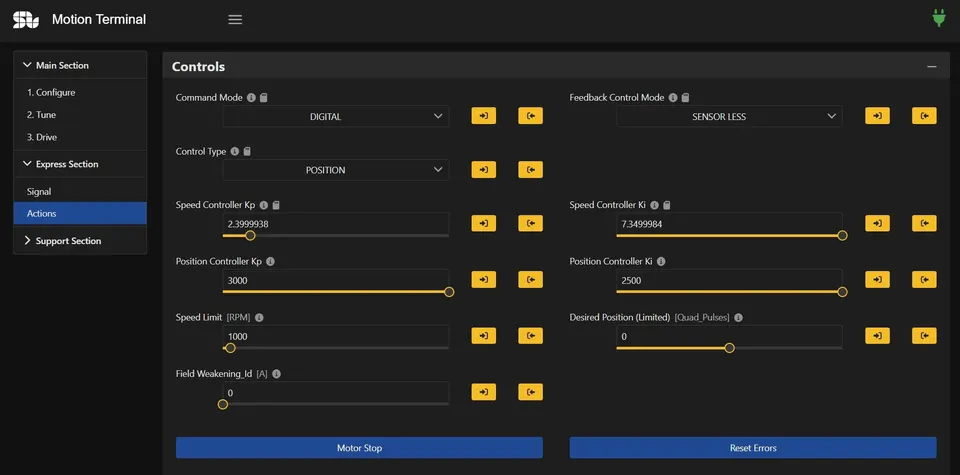
You set both values in Motion Terminal, the same app you use for commissioning and tuning. The goal is a stall time short enough to protect the motor, but long enough that a normal start does not look like a fault.
Setting the Stall Time
There is no single correct number. The right stall time depends on how fast your motor heats and how long a real start takes. A conservative (longer) time avoids nuisance trips but lets the motor sit in the stall a bit longer. An aggressive (shorter) time protects faster but is easy to false-trigger.
Two cases need extra room. A high-inertia load, like a heavy flywheel, takes time to get moving, so the current stays high at the start of every run. A motor with a hard breakaway, where the load resists until it lets go, looks similar. For both, set the stall time longer than the worst-case startup, then add a margin.
Takeaway: size the stall time to your slowest real start, then leave a margin so it never trips on a good run.
Avoiding False Trips at Startup
The most common complaint is a stall fault during a normal start. The reason is simple. At the moment of startup the shaft is still slow and the current is high, which is exactly what a stall looks like. The fix is to make sure the move itself does not stay in that state longer than the stall time.
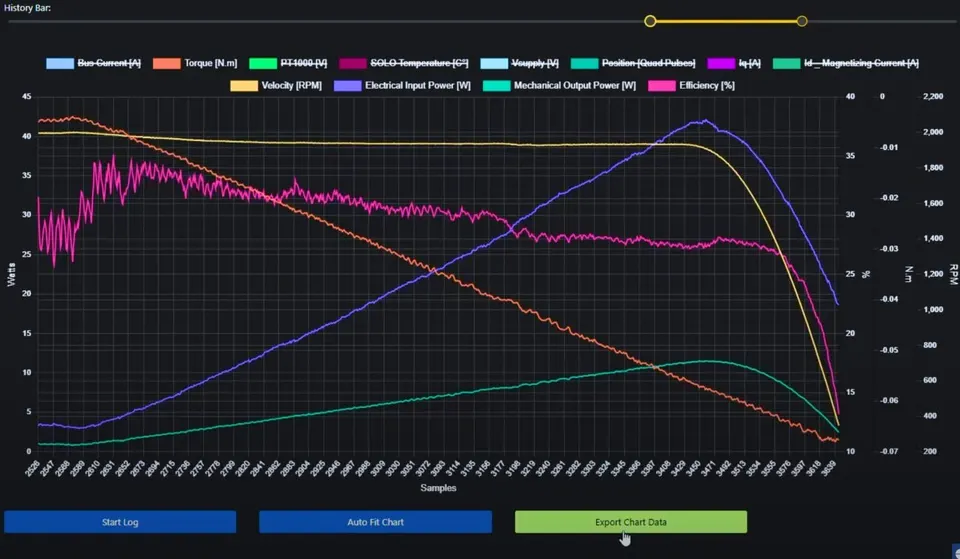
Coordinate the stall time with your acceleration ramp. A steep ramp that demands full speed instantly can hold high current at low speed for a noticeable time, which trips the fault. A smoother ramp lets the rotor pick up speed before the current peaks, so the stall window closes on its own. If you tune the ramp and the trips stop, the problem was the profile, not the motor. For more on shaping the move, see how to set speed, acceleration, and deceleration.
Takeaway: if you false-trip at startup, smooth the acceleration ramp before you lengthen the stall time.
Motor Protection Beyond Stall
Stall detection is one layer. A robust setup pairs it with current and thermal limits, and with a clear way to read what tripped.
Current and Thermal Limits
The current limit is the cap on how much current the drive will push into the motor at any moment. It is your first line of defense, because it bounds the current even before a stall is declared. During a stall, the loop runs straight into this limit, so a sensible current limit decides how hard the stalled winding is driven in the seconds before the stall time elapses.
Set the current limit from your motor’s continuous and peak ratings, not from the drive’s maximum. A limit that is too high removes the protection; one that is too low robs you of torque on a normal heavy load. For how the current limit and regeneration limit work together, see the guide on motor current and regeneration limit.
Takeaway: the current limit bounds the stall current, so set it from the motor’s rating, not the drive’s ceiling.
Reading the Fault Register
When the drive stops, the error register tells you why. A stall raises its own fault code, separate from over-current or over-temperature, so you can tell a blocked shaft apart from a thermal trip or a wiring fault. Read the register in Motion Terminal, confirm the cause, fix it, then clear the fault to re-enable the drive.
Reading the register first saves time. A stall code points you at the mechanics, the load, or the ramp. An over-current or over-temperature code points somewhere else. For a full walk-through of the codes and how to clear them, see the troubleshooting guide on reading SOLO faults.
Takeaway: read the error register before you re-enable, so you fix the real cause instead of guessing.
Stall Protection vs Safe Torque Off
These two are easy to confuse, and they are not the same. Stall protection is a load-side feature. It watches current and speed, and it stops the drive when the shaft will not turn under command. Its job is to protect the motor and the power stage from an overload. It is software, and it relies on the drive working normally to act.
Safe Torque Off, or STO, is a functional-safety feature. It removes the drive’s ability to produce torque through a hardware path, by design, even if the firmware misbehaves. STO is about keeping a person safe near the machine, and it is certified to a safety standard. To understand that distinction in full, read the explainer on Safe Torque Off.
In short: stall protection guards the motor from a bad load. STO guards the operator from the motor. You may want both, for different reasons.
Takeaway: stall protection is load protection in software; STO is operator safety in hardware.
Conclusion
Stall detection protects your motor and drive from a shaft that will not turn under command. SOLO combines a current threshold with a stall time, so it only trips when current stays high and speed stays near zero together. You set both values in Motion Terminal, and you avoid nuisance trips at startup by matching the stall time to a smooth acceleration ramp. Pair it with a sensible current limit and a habit of reading the error register, and most overload faults become quick to diagnose. To configure stall detection and the rest of your protection settings, open your drive in the SOLO Motion Terminal.
FAQ
What stall time should I set?
Set it longer than your slowest real startup, then add a margin. There is no universal number, because it depends on how fast your motor heats and how long the load takes to get moving. Start conservative, watch a few normal runs, and shorten it only if your motor needs faster protection.
Why does my motor trip a stall fault during normal startup?
At the start of a move the rotor is still slow while current is high, which looks like a stall. A steep acceleration ramp keeps the motor in that state too long. Smooth the ramp so the rotor speeds up before the current peaks, and the stall window closes on its own. Lengthening the stall time is the second option, not the first.
Is stall detection the same as Safe Torque Off?
No. Stall detection is software that protects the motor and drive from an overloaded or blocked shaft. Safe Torque Off is a certified hardware feature that removes torque to keep a person safe, even if the firmware fails. They solve different problems and can be used together.
How do I clear a stall fault?
Read the error register in Motion Terminal to confirm the cause is a stall, fix the mechanical problem, and then clear the fault to re-enable the drive. The fault stays latched until you clear it, so the motor does not restart into the same blocked condition by accident.
Related articles
Disable/Enable Drive and Freewheeling: Safe Motor Stopping
How disable and enable drive work on SOLO, the difference between a controlled stop and freewheeling, and how to stop a motor safely.
PWM Frequency Selection for Low-Inductance Motors
How to choose the PWM switching frequency on SOLO, why low-inductance motors need a higher frequency, and the trade-offs with heat and ripple.
Open-Loop Manual Mode: Spinning a Motor with Potentiometers
How to spin a motor in open-loop manual mode on SOLO with potentiometers and no programming. When open loop is enough, and its limits.
