
PWM Frequency Selection for Low-Inductance Motors
Introduction
A 5 microhenry motor run at 20 kHz can see current ripple above 30% of its rated current. That ripple turns into heat, torque noise, and a control loop that never feels stable. The fix is not a better PID gain. It is the right PWM frequency for the motor you actually have.
This guide shows you how to pick the PWM switching frequency on SOLO. You will see why low-inductance motors need a higher frequency, what you trade away when you raise it, and how to set and verify the value in Motion Terminal.
What PWM Frequency Controls
PWM, or pulse-width modulation, is how the controller chops the DC bus into the average voltage each phase needs. The switching frequency is how many times per second the power MOSFETs turn on and off. On most BLDC and PMSM setups it sits somewhere between 10 kHz and 80 kHz.
That frequency does two jobs. First, it sets how smooth the current ripple is. Each switching period, current rises and falls a little around its target. A faster switch leaves less time for that swing, so the ripple shrinks. Second, it sets how cleanly the field-oriented control, or FOC, can shape the current waveform. A higher switching rate gives the current loop more updates per electrical cycle, which generally improves control fidelity at high speed.
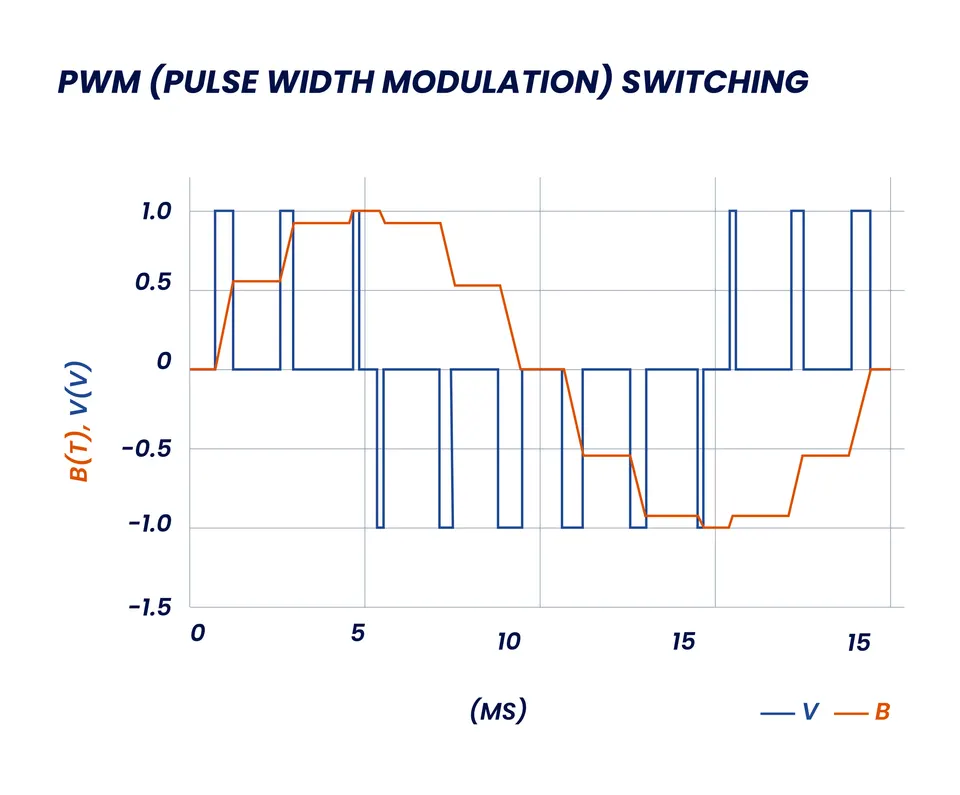
Takeaway: PWM frequency decides how smooth your current is and how well FOC can track it.
Why Low-Inductance Motors Need a Higher Frequency
Inductance resists fast changes in current. The current ripple in one switching period scales roughly with the bus voltage divided by the motor inductance, multiplied by the switching period. So when inductance is low, current climbs and falls quickly between switches, and the ripple grows.
Low-inductance motors are common. Slotless and coreless designs, high-speed drone and turbine motors, and many small outrunners can sit well under 50 microhenries per phase. At a fixed PWM frequency, halving the inductance roughly doubles the ripple. To hold the same ripple, you raise the switching frequency instead.
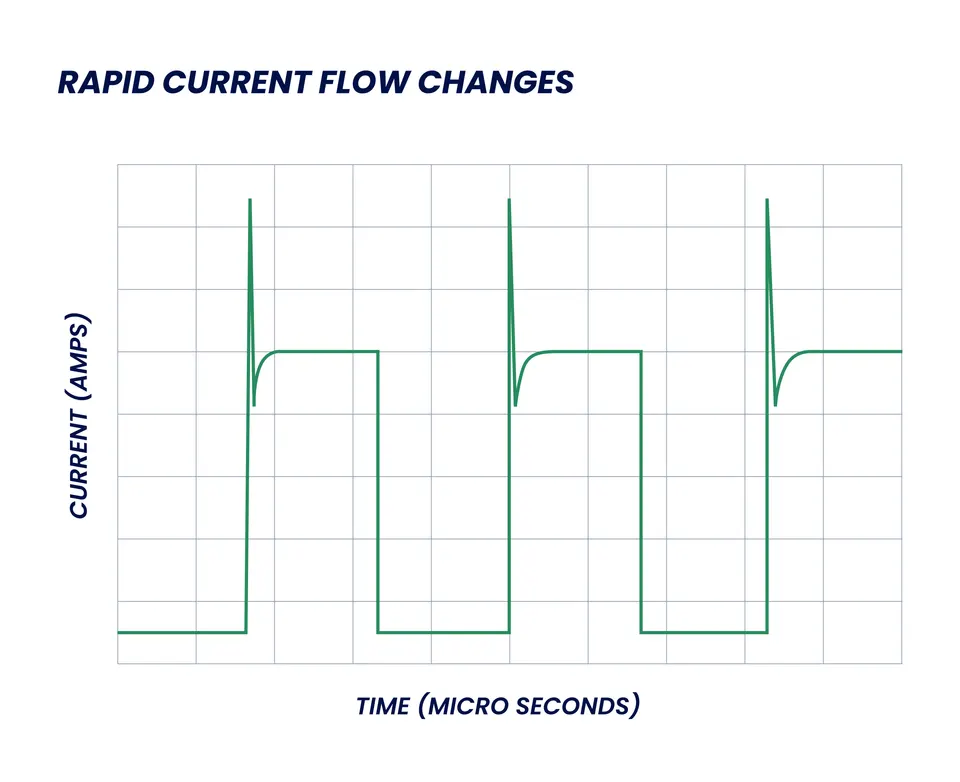
If you want the background on why these motors behave this way, see our guide to running a low-inductance motor. The short version: low L means fast current, and fast current needs faster switching to stay clean.
Takeaway: less inductance means more ripple at the same frequency, so low-L motors ask for a higher PWM frequency.
The Trade-offs of Raising PWM Frequency
Higher is not free. Every switch event costs energy and stresses the power stage, so there is a ceiling. Three things push back when you raise the frequency.
Switching Losses and Heat
Each time a MOSFET switches, it dissipates a small burst of energy during the transition. Double the switching frequency and you roughly double these switching losses. That heat lands on the power stage, not the motor. Past a point, a higher PWM frequency makes the controller run hotter and can force you to derate the current. The motor windings see less ripple heating, but the electronics see more switching heating, so the win is a balance, not a one-way gain.
Audible Noise
Switching frequency often shows up as audible noise from the motor and the controller. Frequencies in the low kHz range produce a clear whine that humans hear well. Pushing above roughly 20 kHz moves most of the energy past the range of human hearing, which is one practical reason teams choose values in the 16 kHz to 24 kHz band for quiet products.
Maximum Frequency on SOLO Hardware
There is a hard ceiling set by the controller. The deadtime, the gate driver, and the control loop timing all limit how high you can go before the duty-cycle resolution and the loop both suffer. Stay within the rated PWM range for your unit. Check the specs for your model on the SOLO controller product page before you set an aggressive value, since the safe maximum depends on the hardware you run.
Takeaway: raise PWM frequency to cut ripple, but watch heat, noise, and the controller’s rated limit.
How to Set PWM Frequency in Motion Terminal
In Motion Terminal you set the switching frequency as a configuration value, then write it to the controller. The workflow is simple: connect to the unit, enter the target PWM frequency in kHz, write the configuration, and run the motor at a representative speed and load. Change one variable at a time so you can see what each value does.
Reading the Effect on Current Ripple
The fastest way to judge a setting is to watch the current, not guess. Use the built-in oscilloscope view to plot Iq and Id while the motor runs. The ripple band around the target current is your ripple, in amps. Lower the PWM frequency and the band widens. Raise it and the band tightens. This turns an abstract choice into a number you can read off the screen.
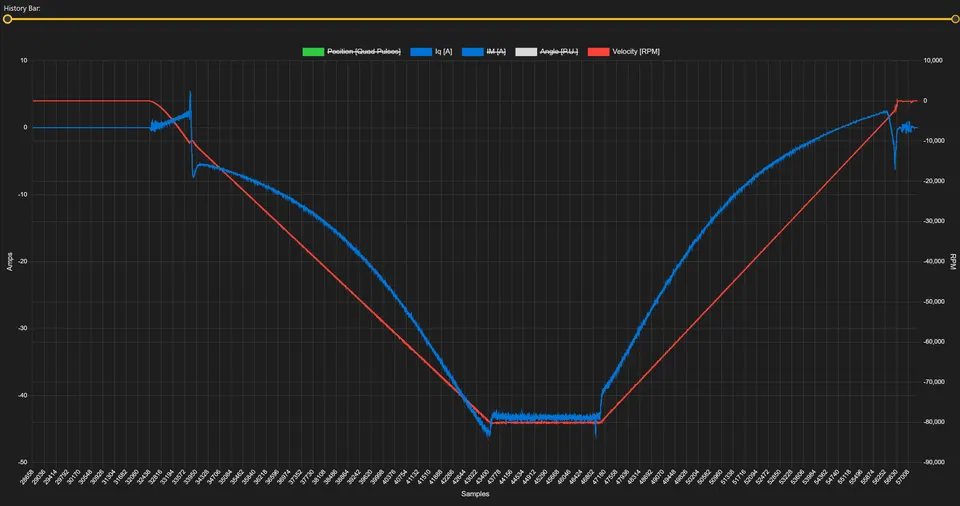
Aim for a ripple that stays within a sensible share of your rated current. Many setups target ripple under about 10% to 20% of rated current at the worst operating point. Pick the lowest PWM frequency that holds your ripple target, because that keeps switching losses down.
A Practical Selection Rule
You do not need a perfect model to get close. Use the motor’s per-phase inductance to land a starting PWM frequency, then verify with the scope. Lower inductance moves you up the table.
| Phase inductance (per phase) | Motor examples | Starting PWM frequency | Notes |
|---|---|---|---|
| Above 1 mH | Large industrial PMSM, geared BLDC | 8 kHz to 16 kHz | Ripple stays low naturally |
| 200 µH to 1 mH | Typical mid-size BLDC and PMSM | 16 kHz to 24 kHz | Quiet band, common default |
| 50 µH to 200 µH | High-speed servo, small outrunner | 24 kHz to 40 kHz | Watch controller heat |
| Below 50 µH | Slotless, coreless, drone, turbine | 40 kHz and up | Check the rated maximum first |
Treat these as starting points, not final values. Set the frequency, run the motor at its hardest operating point, read the ripple on the scope, and adjust. As a rule, raise the frequency until the ripple is acceptable, then stop.
Takeaway: pick a starting frequency from inductance, then tune it against the ripple you measure.
Symptoms of a Wrong PWM Frequency
A wrong PWM frequency shows up in ways that look like other problems. Watch for these signs.
- High current ripple on the Iq and Id plots, wider than your target band.
- Extra heat in the motor windings from ripple, or in the controller from too-high a frequency.
- Unstable control, where the loop hunts or oscillates and no PID tuning fully settles it.
- Audible whine when the frequency sits in the low kHz range.
- Reduced torque accuracy at high speed, because the current loop cannot track a clean waveform.
If you see these after a tuning pass, do not keep adjusting gains. Check the PWM frequency first. A motor that ripples hard will fight the current loop no matter how well you tune it.
Takeaway: ripple, heat, whine, and a loop that never settles often point back to the PWM frequency.
How SOLO Helps You Set the PWM Frequency
SOLO controllers let you set the PWM switching frequency directly, and Motion Terminal helps you verify the choice instead of guessing. You can write the frequency, then watch the current ripple on the integrated oscilloscope to confirm the setting fits your motor. The same controllers support DC, BLDC, PMSM, and AC induction motors, so the workflow stays the same as you move between motor types. If you run several motors with different inductance, you can keep a configuration per motor and load the right one each time. You can explore the tool on the SOLO Motion Terminal page.
Conclusion
Choosing a PWM frequency comes down to a balance. Lower inductance means faster current and more ripple, so low-inductance motors generally need a higher switching frequency. But every step up costs switching loss and heat in the controller, and the hardware sets a hard maximum. Start from your motor’s per-phase inductance, pick a frequency from the table, then run the motor and read the current ripple on the scope. Keep the lowest frequency that holds your ripple target. To set and verify the value on your own bench, open the SOLO Motion Terminal and watch the ripple change as you tune.
FAQ
What PWM frequency should I use for a low-inductance motor?
It depends on the inductance, but low-inductance motors generally need a higher frequency than standard ones. As a starting point, a motor between 50 and 200 microhenries often runs well at 24 kHz to 40 kHz, and very low values below 50 microhenries can need 40 kHz or more. Always check the rated maximum for your controller, then verify the ripple on the scope.
Does a higher PWM frequency make the motor run cooler?
It cuts the ripple heating in the motor windings, so the motor itself can run a little cooler. The trade-off is that the controller runs hotter, because switching losses rise with frequency. The goal is the lowest frequency that keeps your ripple acceptable, not the highest possible value.
Can a high PWM frequency damage the controller?
Staying within the rated PWM range for your model is safe. Going beyond it raises switching losses and heat, reduces duty-cycle resolution, and can force you to derate the current. Check the specs for your unit before setting an aggressive value, and keep the current within limits at the chosen frequency.
How do I see current ripple to verify my setting?
Use the oscilloscope view in Motion Terminal to plot Iq and Id while the motor runs at a representative speed and load. The width of the band around the target current is your ripple in amps. Lower the PWM frequency and the band widens, raise it and the band tightens, which lets you read the effect of each setting directly.
Related articles
Analog vs Digital Mode on SOLO: When to Use Which
Analog or digital command mode on SOLO? Compare analog inputs vs UART, USB and CAN control to pick the right command interface for your project.
Automatic Motor Identification: How SOLO Measures R, L and Kt
How SOLO's automatic motor identification measures resistance, inductance and Kt in one routine, so you commission a motor with no programming.
How to Commission a Motor in Motion Terminal: Step by Step
A step-by-step guide to commissioning a motor with SOLO Motion Terminal: connect, identify, calibrate, and run your first closed-loop spin.
