
Position Control Tuning on SOLO: Kp and Ki for Accurate Positioning
Introduction
A position loop that is set too loose can sit a full degree away from the target, and one that is set too tight can swing past it three or four times before it settles. Both cost you accuracy, and both waste machine time. Position control tuning is how you close that gap, so the axis lands on the setpoint and stays there.
This guide is about one thing: how to tune the position loop on SOLO with the right Kp and Ki. You will set the proportional gain first, add integral gain to kill steady-state error, then deal with overshoot and hunting. If you want the math and theory behind the control loop, our PID tuning guide covers the basics. Here we stay on the position-loop specifics.
Takeaway: tune Kp for stiffness, Ki for accuracy, and watch the response before you trust the numbers.
How the Position Loop Works on SOLO
SOLO controls position with nested loops. The innermost loop is torque (current), the middle loop is speed, and the outermost loop is position. The position loop reads where the shaft is, compares it to where you asked it to be, and outputs a speed command. The speed loop turns that into a torque command, and the torque loop drives the current. Each inner loop must be stable before the loop outside it can work.
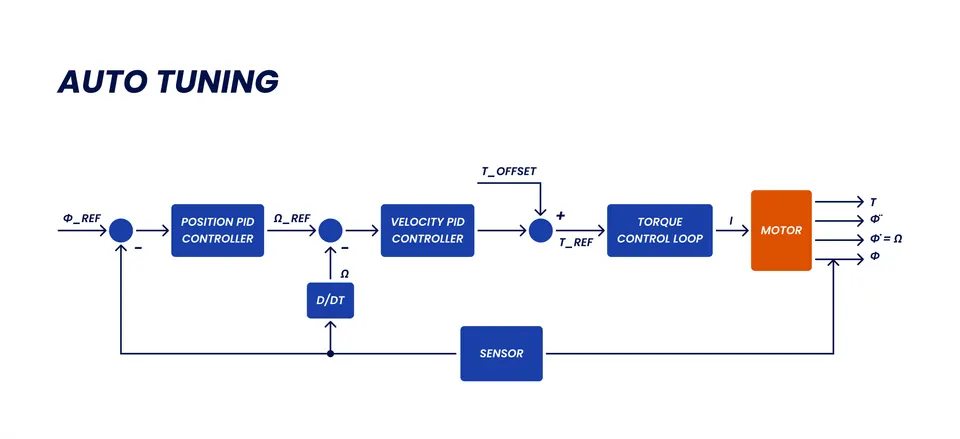
This order matters for tuning. If your speed loop is sloppy, the position loop will fight it, and no position gain will fix that. So tune the inner loops first, then move outward. The position loop needs a clean encoder or other position feedback, because it acts on that signal directly. For the practical side of wiring and reading position feedback, see position control with incremental encoders on SOLO. For how the three control modes relate, see torque, speed, and position control.
Takeaway: position sits on top of speed and torque, so tune from the inside out.
Setting Kp for the Position Loop
Kp, the proportional gain of the position loop, sets how hard the controller reacts to position error. A larger Kp makes the axis stiffer, so it pulls back to the target faster and resists disturbances better. Push it too far and the axis overshoots and oscillates around the setpoint.
Start low and raise Kp in steps. A common approach is to roughly double it each time, command a small position step, and watch the response. Keep increasing until you see the first signs of overshoot or ringing, then back off by about 20 to 30 percent. That gives you a stiff loop with margin. The table below shows what each gain does and how a wrong value shows up.
| Gain | What it does | Symptom if too high | Symptom if too low |
|---|---|---|---|
| Kp (proportional) | Sets stiffness and reaction speed to position error | Overshoot, ringing, audible buzzing, oscillation around the target | Soft response, slow to reach target, large position error under load |
| Ki (integral) | Removes the leftover steady-state error over time | Slow oscillation, overshoot that builds up, integral windup after a hard move | Axis settles near but never exactly on the target, constant offset |
Use this as your map for the next two sections. Set Kp for a fast, stable response first, then bring in Ki only to remove the small error that Kp alone leaves behind.
Takeaway: raise Kp until you see overshoot, then back off about a quarter.
Adding Ki to Remove Steady-State Error
With Kp set, the axis will get close to the target, but it often parks a small distance away under a steady load. That gap is steady-state error, and a proportional gain alone cannot remove it, because as the error shrinks the corrective push shrinks with it. Ki, the integral gain, fixes this. It sums the error over time and keeps pushing until the error reaches zero.
Add Ki slowly. Start from a small value and raise it until the axis settles exactly on the setpoint within an acceptable time. Too much Ki causes a slow oscillation and a kind of overshoot that builds over a few cycles, because the integral term keeps acting after the error is already gone. This buildup is called integral windup. If you see the response get slow and wallowy, lower Ki.
A good rule is to add only as much Ki as you need for accuracy, not more. The proportional term should do most of the work, and Ki should clean up the last bit of error.
Takeaway: Ki removes the final offset, but keep it small to avoid windup.
Avoiding Overshoot and Hunting
Two problems show up most often once Kp and Ki are in the right range. Overshoot is when the axis passes the target and comes back. Hunting is when it never quite stops, and keeps making small corrections back and forth around the setpoint. Both feel like the loop is unstable, and both have clear causes.
Overshoot usually means Kp is too high, or the inner speed loop is too slow to keep up. Lower Kp a little, and confirm the speed loop is tuned. Hunting usually means too much gain for the feedback resolution, or a noisy encoder signal. If the position sensor jitters, the controller chases that noise and never settles.
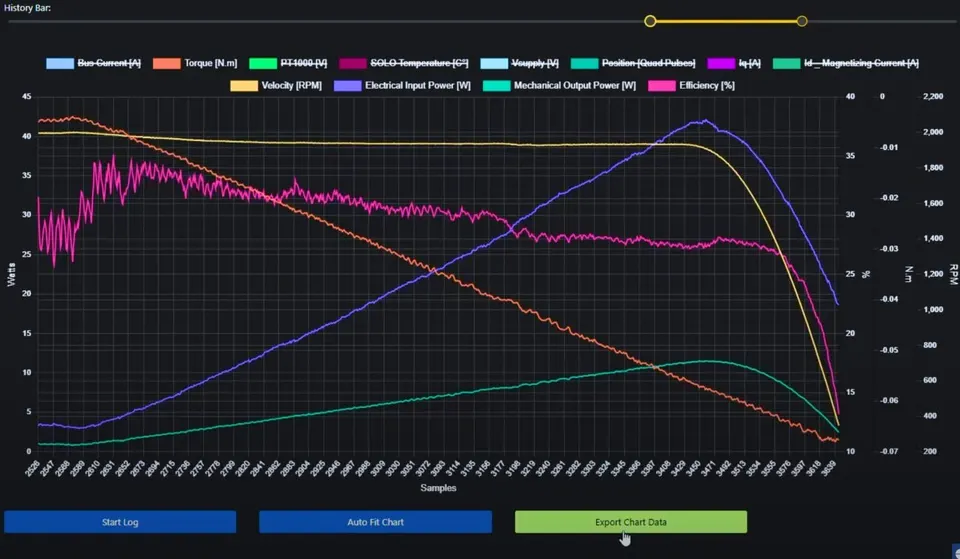
The fastest way to tell these apart is to look at the actual response. Command a step and watch the position and speed curves over time. Overshoot looks like a single swing past the line; hunting looks like a steady buzz that never flattens. Seeing the real shape tells you which gain to touch, so you stop guessing.
Takeaway: overshoot points to Kp or the speed loop, hunting points to gain or noisy feedback.
Tuning with a Motion Profile
Tuning against a hard position step is the toughest test, because you ask for an instant jump. Real machines rarely move that way. They follow a motion profile, a planned path of acceleration, constant speed, and deceleration, so the load is never hit with a sudden command.
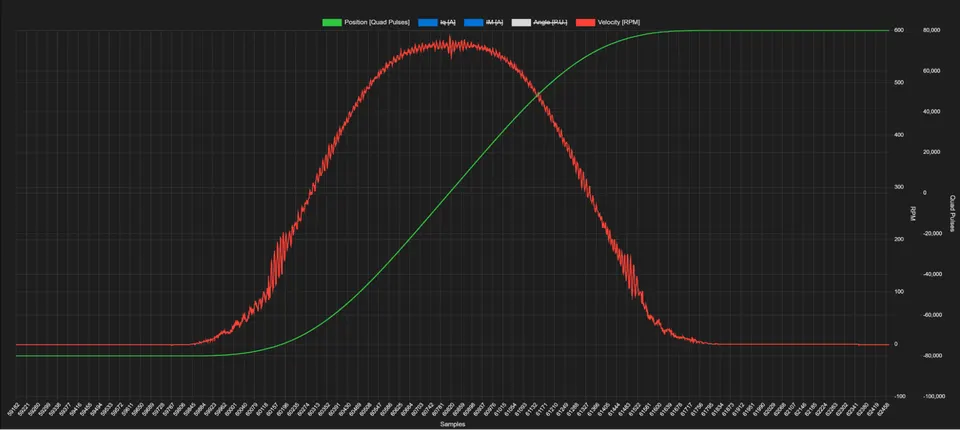
Tuning with a profile gives you gains that match how the axis actually runs. A loop that overshoots on a hard step may be perfectly fine on a smooth ramp, and a smooth ramp puts far less stress on the mechanics. So validate your Kp and Ki twice: once on a step to find the limits, and once on the real profile to confirm the axis tracks the planned path with low error. If the two disagree, trust the profile, because that is the move your machine will make in production.
Takeaway: confirm your gains on the real motion profile, not just a hard step.
How SOLO Helps You Tune the Position Loop
The SOLO Motion Terminal is built to make this loop visible while you tune. You can set Kp and Ki for the position loop, command a step or a profile, and watch the position, speed, and current respond live on the same screen. That live view is what turns tuning from guesswork into a few quick, informed adjustments. The terminal also supports the nested torque, speed, and position loops in one place, so you can tune from the inside out without switching tools. If you want to try it on your own axis, the SOLO Motion Terminal is the place to start.
Conclusion
Position control tuning on SOLO comes down to a clear order. Tune the inner speed and torque loops first, then raise Kp until you see overshoot and back off about a quarter. Add Ki slowly to remove the last bit of steady-state error, and keep it small to avoid windup. When overshoot or hunting shows up, watch the real response to tell which gain to touch. Validate everything on the motion profile your machine actually runs, not only on a hard step. To tune and watch your own position loop in real time, open the SOLO Motion Terminal.
FAQ
Why does my motor overshoot the target position?
Overshoot usually means the position gain Kp is set too high, so the controller drives the axis past the target before it can slow down. A slow or untuned inner speed loop can cause the same effect. Lower Kp by 20 to 30 percent, confirm the speed loop is stable, and check the response again on a step command.
Kp or Ki: which one for position accuracy?
Use both, in order. Kp gives you a fast, stiff response and gets the axis close to the target. Ki removes the small steady-state error that Kp alone leaves behind, so the axis lands exactly on the setpoint. Set Kp first, then add only as much Ki as you need for accuracy.
How do I stop the motor hunting around the setpoint?
Hunting, the constant small back-and-forth around the target, usually comes from too much gain for your feedback resolution or from a noisy encoder signal. Lower the gain a little and check that the position feedback is clean. If the sensor jitters, the controller chases that noise and never settles, so fixing the feedback often matters more than the gains.
Related articles
Tuning Sensorless Injection (Amplitude and Frequency) on SOLO
How to tune the ZSFT injection amplitude and frequency on SOLO for stable, low-noise sensorless control at standstill and low speed. A Motion Terminal guide.
Using the Motion Terminal Oscilloscope: Read Iq, Id, Speed, Position
How to use the built-in oscilloscope in SOLO Motion Terminal to monitor Iq, Id, speed and position in real time, and tune with confidence.
Speed Control Tuning on SOLO: Kp and Ki Without Overshoot
How to tune the speed loop on SOLO: set Kp and Ki for a fast, stable speed response under load, without overshoot. A Motion Terminal guide.
