
Speed Control Tuning on SOLO: Kp and Ki Without Overshoot
Introduction
A motor that holds 3000 RPM on the bench can sag to 2600 RPM the moment a real load hits it, then swing back and forth before it settles. That wobble is not a bad motor. It is a speed loop that is not tuned for the job. When the speed your motor reports starts to dance under load, the fix is almost always in two numbers: the proportional gain Kp and the integral gain Ki.
This guide shows you how to set Kp and Ki for the speed loop on SOLO, so the motor reaches the target fast and holds it under changing load, without overshoot. We cover what each gain does, how to read the symptoms, and where the limits sit. For the general theory behind a control loop, our PID tuning guide is the place to start. Here we stay on the speed loop.
How the Speed Loop Works on SOLO
The speed loop is a closed-loop controller. It reads the actual speed from the encoder or from the sensorless estimate, compares it to the target speed, and works to close the gap. The difference between target and actual is the error. The controller turns that error into a torque command, and the inner current loop makes that torque happen.
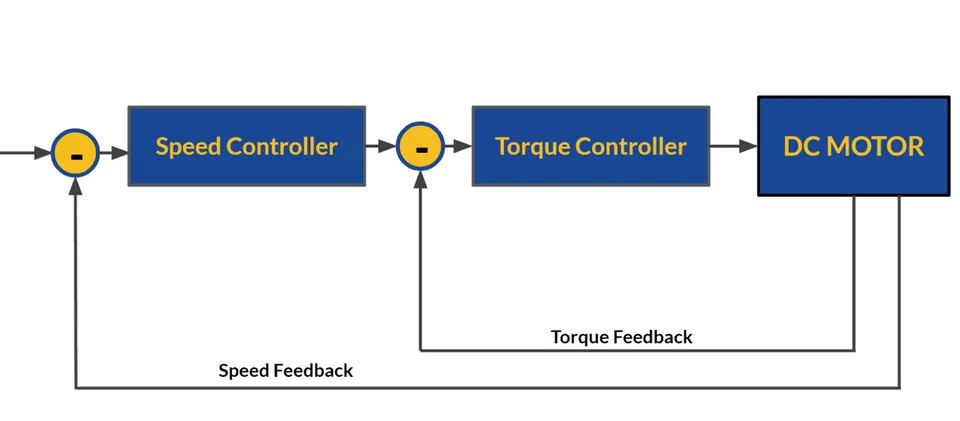
Two terms drive the loop. Kp reacts to the error right now: a bigger error gives a bigger correction. Ki reacts to error that builds up over time, so a small offset that never goes away keeps pushing the output until it is gone. The speed loop sits on top of the current loop, so it is a cascade. Tune the current loop first, then the speed loop on top. If you want the bigger picture of how torque, speed, and position relate, see torque, speed and position control.
Takeaway: the speed loop converts speed error into a torque request, and Kp and Ki shape how fast and how cleanly it does that.
Setting Kp for the Speed Loop
Start with Kp. It sets how hard the loop pushes back the instant speed drifts from the target. A higher Kp gives a faster response and a stiffer hold against load. Push it too high and the loop becomes nervous: the motor overshoots the target, then oscillates around it.

The practical method is simple. Set Ki to zero or very low, then raise Kp step by step. Command a speed step, watch the response, and keep going until the motor reaches the target quickly with a small, clean overshoot. Then back off a little. That is your Kp. The table below maps each gain to what it does and the symptom you see when it is wrong, so you can read the response instead of guessing.
| Gain | Effect | Symptom if too high | Symptom if too low |
|---|---|---|---|
| Kp (proportional) | Reacts to the present error; sets response speed and stiffness | Overshoot, oscillation, audible buzz, the motor hunts around the target | Slow, sluggish response; speed sags under load and recovers late |
| Ki (integral) | Removes leftover error over time; holds the exact target | Slow oscillation, overshoot that takes long to settle, integral windup after a limit | Steady-state error: the motor settles near the target but never on it |
Takeaway: raise Kp until you see a small overshoot, then back off. Fast and stable beats fast and ringing.
Adding Ki for Zero Steady-State Error
Kp alone almost always leaves a gap. Under a steady load, a proportional-only loop settles a little below the target and stays there, because some error is needed to produce the holding torque. That leftover gap is steady-state error. This is the job of Ki.
Ki sums the error over time and keeps nudging the output until the gap is gone, so the motor lands on the exact target speed and holds it. Add Ki after Kp is set. Raise it slowly. Too much Ki brings its own trouble: a slow oscillation, a long overshoot, and integral windup, where the integral term keeps building while the output is saturated at a current or torque limit, then overshoots badly when the limit clears.
A good speed loop is a balance. Kp handles the fast reaction, Ki cleans up the slow, steady offset. Tune Kp first for speed, then Ki for accuracy, and check the full step response after each change.
Takeaway: Ki removes the steady gap that Kp leaves behind. Add it last, and add it gently.
Holding Speed Under Load
The real test is not a no-load step. It is whether the motor holds its target speed when the load changes. A well-tuned speed loop reacts to a sudden load by raising torque fast enough that the speed barely dips, then returns to target without a long swing.
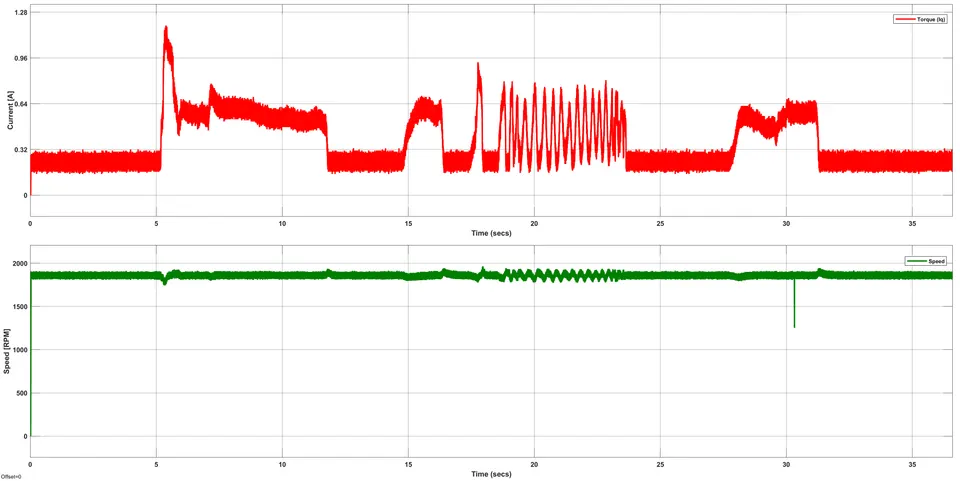
To check this, run the motor at a constant speed and apply load steps while you watch the response. You want a small speed dip on the load step and a quick, clean recovery. A large dip that recovers slowly means Kp is too low. A recovery that overshoots and rings means Kp or Ki is too high. The same gains that gave a clean no-load step do not always hold under load, so always validate with the load your application actually sees. Watching the current trace at the same time tells you whether the loop is asking for more torque than the drive can deliver.
Takeaway: tune on a no-load step, but confirm on real load steps. A small dip with a fast recovery is the goal.
Acceleration and Deceleration Limits
Tuning Kp and Ki is only half the picture. How fast you ask the motor to change speed matters too. If you command a large speed step with no ramp, the loop demands a torque spike that can hit the current limit, trip a fault, or cause a hard mechanical jolt. Acceleration and deceleration limits smooth the target so the loop is not asked for the impossible.
A ramp on the speed command keeps the torque request inside the drive’s range and makes the motion predictable. On deceleration there is a second factor: a fast slow-down feeds energy back into the bus. That regenerated energy has to go somewhere, so a sensible decel ramp and a correct regeneration limit keep the bus voltage safe. Set realistic accel and decel limits before you chase the last bit of gain. They often remove an overshoot that no amount of Kp and Ki tuning would fix cleanly.
Takeaway: ramp the speed command so the loop has a target it can actually follow, and watch the bus on hard decelerations.
How SOLO Helps You Tune the Speed Loop
SOLO is built to make this loop easy to set. The Motion Terminal gives you direct access to the speed controller Kp and Ki, so you change a gain and see the result without writing code. Its live oscilloscope view plots the target speed, the actual speed, and the current at the same time, which is exactly what you need to read overshoot, dips, and recovery during a tune.
Because the speed loop runs on the same controller across DC, BLDC, PMSM, and AC induction motors, the tuning method stays the same as you move between motors. SOLO controllers also support an auto-tuning step that gives you a working starting point, so you refine the gains rather than search from zero. You can explore the workflow on the SOLO Motion Terminal page.
Conclusion
Tuning the speed loop comes down to two gains used in order. Raise Kp until the motor reaches the target fast with a small, clean overshoot, then back off. Add Ki to remove the steady-state error so the motor holds the exact target under load. Validate with real load steps, not just a no-load command, and set sensible accel and decel limits so the loop is never asked for a torque it cannot deliver. When you are ready to dial in your own motor, the SOLO Motion Terminal gives you the gains and the live plots to do it in one place.
FAQ
Why does my motor speed drop under load?
A speed drop under load usually means the loop is not reacting hard or fast enough. With a proportional-only loop, some error is needed to hold torque, so the motor settles below target. Raise Kp to stiffen the response and add Ki to remove the leftover gap. If the dip is large and slow to recover, Kp is too low for that load.
What are typical Kp/Ki ranges for the speed loop?
There is no single value, because the right gains depend on the motor, the load inertia, and the encoder. That is why you tune rather than copy numbers. Start with Ki low, raise Kp until you see a small overshoot, then add Ki for zero steady-state error. An auto-tuning step gives you a sound starting point to refine from.
Speed loop vs torque loop: what is the difference?
The torque loop, also called the current loop, is the inner loop that makes the motor produce a commanded torque. The speed loop sits on top and commands torque to reach a target speed. Tune the current loop first, then the speed loop on top of it. See torque, speed and position control for how the loops stack.
Related articles
Tuning Sensorless Injection (Amplitude and Frequency) on SOLO
How to tune the ZSFT injection amplitude and frequency on SOLO for stable, low-noise sensorless control at standstill and low speed. A Motion Terminal guide.
Position Control Tuning on SOLO: Kp and Ki for Accurate Positioning
How to tune the position loop on SOLO: set Kp and Ki for accurate, stable positioning without overshoot. A practical Motion Terminal guide.
Using the Motion Terminal Oscilloscope: Read Iq, Id, Speed, Position
How to use the built-in oscilloscope in SOLO Motion Terminal to monitor Iq, Id, speed and position in real time, and tune with confidence.
