
Setting Current and Regeneration Limits on SOLO Safely
Introduction
One wrong number in a config field can cook a motor in seconds. Set the motor current limit too high and a stalled rotor pulls current until the windings overheat. Set the regeneration current limit too high and a hard stop pushes energy back into a power supply that was never built to take it, so it trips or fails.
Both limits exist to protect your hardware. This guide shows you what each one does, how to pick a safe value from your motor and power source ratings, and where to set them in Motion Terminal. You will leave knowing two numbers you can enter with confidence.
The Motor Current Limit
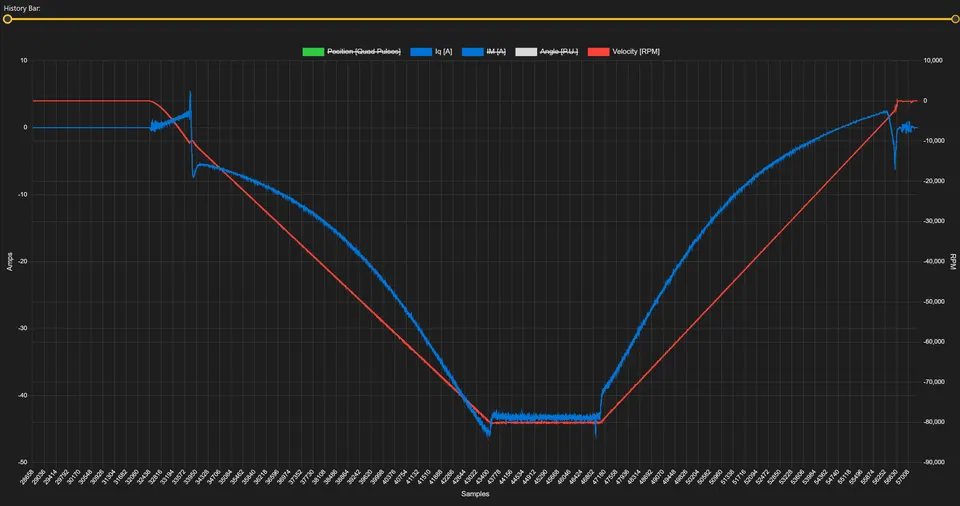
The motor current limit caps how much current the controller will let flow into the motor. In a field-oriented drive, torque is roughly proportional to current, so this limit also caps peak torque. It is the single most important protection you set, because heat in a motor scales with current squared. Double the current and you roughly quadruple the heating in the windings.
The limit guards three things at once: the motor windings, the controller power stage, and any mechanics in the path that could be damaged by excess torque. When the motor stalls or hits a hard mechanical stop, current would otherwise climb until something gives. The limit holds it at a safe ceiling instead.
How to pick a safe value
Start from the motor datasheet. Two numbers matter:
- Continuous (rated) current, the level the motor can hold all day without overheating.
- Peak current, a higher level the motor tolerates for short bursts, usually a few seconds.
As a rule, set your current limit at or below the motor’s peak rating, and make sure your duty cycle keeps the average near the continuous rating. A common starting point is the continuous current for steady running, with headroom up to the peak for acceleration. If your application rarely needs hard acceleration, keeping the limit closer to the continuous value runs the motor cooler.
One more check: your limit can never exceed what the controller itself is rated for. The effective ceiling is the lower of the motor’s peak, the controller’s maximum, and what your power source can deliver. Pick the smallest of the three.
Takeaway: set the motor current limit from the motor’s peak and continuous ratings, then clamp it to whatever the controller and supply allow.
The Regeneration Current Limit
When a motor slows down or reverses, it acts as a generator. The kinetic energy in the rotor and load has to go somewhere, and it flows back through the controller toward the power source. The regeneration current limit caps how much of that energy the controller pushes back per unit time. This is a separate setting from the motor current limit, and it protects a different part of the system: your power source.
Why a separate limit matters depends entirely on what powers your drive.
| Power source | Can it absorb regen energy? | What the regen limit protects |
|---|---|---|
| Battery | Yes, it recharges | Keeps charge current within the battery’s safe limit |
| Bidirectional supply | Yes, it sinks current | Stays within the supply’s reverse-current rating |
| Standard (unidirectional) supply | No, it blocks reverse current | Prevents the bus voltage from spiking and tripping the supply |
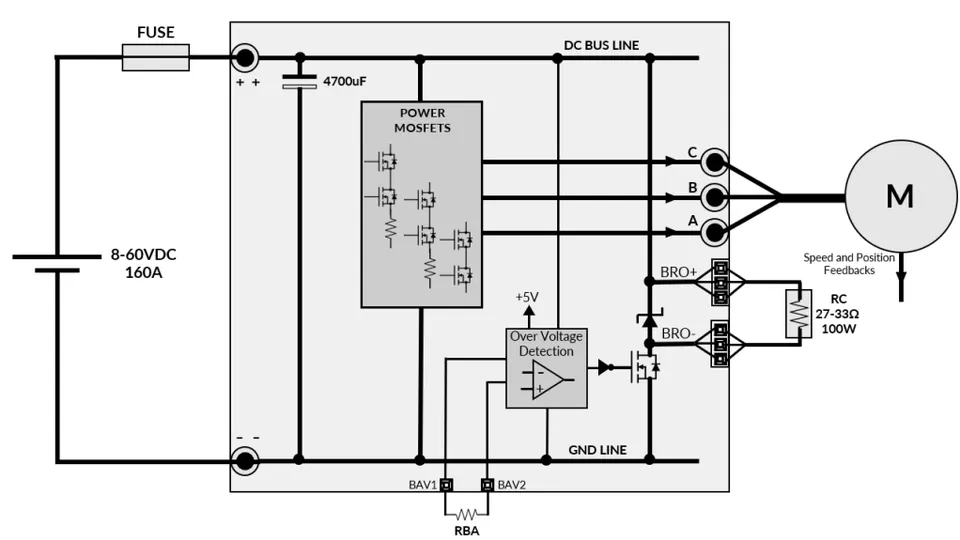
A battery can take energy back, so braking recharges it. That is the basis of regenerative braking, and the limit there mainly protects the battery’s safe charge rate. A standard bench power supply is unidirectional. It can push current out but cannot pull it back in. When regen energy arrives with nowhere to go, the bus voltage rises. Push too hard and the supply hits its overvoltage protection and shuts off, or in the worst case the voltage spike damages the controller.
So the regen limit is your tool to keep braking energy within what the source can swallow. With a unidirectional supply, you keep it low, or you add a brake resistor (a chopper circuit that burns the extra energy as heat) to give the energy a path. For more on how this energy recovery works end to end, see our guide to regenerative braking.
Takeaway: the regen limit protects the power source. Batteries absorb the energy, plain supplies do not, so set it accordingly.
Setting the Limits in Motion Terminal
Both limits live in the controller configuration and you set them from Motion Terminal. Connect to the board, open the Controls panel, and you will find the current limit field alongside the other drive parameters.
The workflow is straightforward:
- Enter the motor current limit in amps, using the value you chose from the motor and controller ratings above. Start conservative if you are unsure. You can always raise it later once you have watched the motor run.
- Enter the regeneration current limit to match your power source. Low for a unidirectional supply, higher for a battery or bidirectional supply that can absorb the energy.
- Save the configuration to the controller so the limits persist across power cycles.
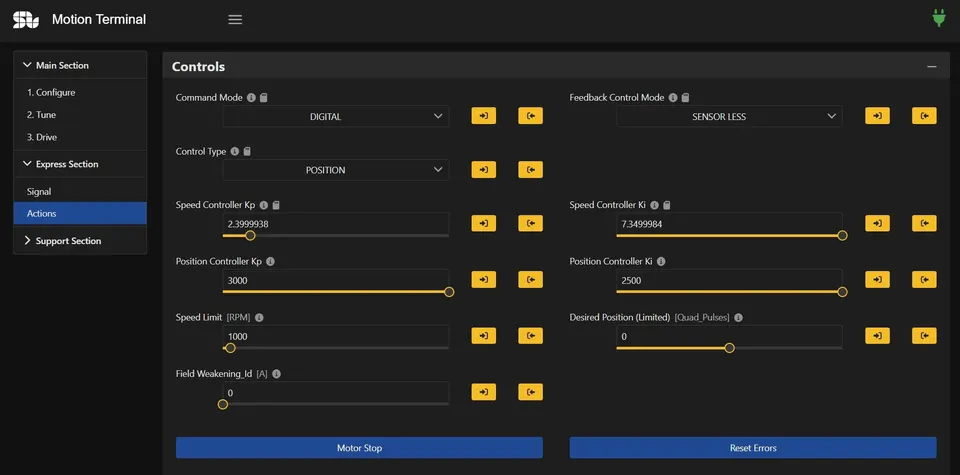
A good habit is to verify the limits in practice, not just on paper. Run the motor, command an acceleration and a stop, and watch the current. Motion Terminal plots the actual current live, so you can confirm the drive is clamping where you expect. If you see the current flat-topping at your limit during a stall, the protection is working.
Takeaway: set both values in the Controls panel, save to the controller, then verify them with a live run.
Limits and Deceleration
The regen limit and your deceleration setting work together, and one can hide a problem with the other. The faster you stop a motor, the more energy comes back per unit time, and the harder it pushes on your power source. A hard stop from high speed is the worst case for regeneration.
This gives you a second, gentler lever. If your supply trips during braking even with a sensible regen limit, slow the deceleration ramp. A longer decel time spreads the same kinetic energy over more seconds, so the regenerated power, which is energy per second, drops. The motor still stops, just less abruptly, and the bus voltage stays calmer.
In short, the regen current limit sets the ceiling, and the deceleration ramp sets how often you hit it. Tune both together. If you cannot lower the regen limit without losing the stopping performance you need, easing the decel ramp is often the cleaner fix, especially on a unidirectional supply.
Takeaway: a slower deceleration ramp reduces regenerated power, so pair it with the regen limit when a supply trips on hard stops.
How SOLO Helps You Protect Your Motor
SOLO controllers handle both limits in firmware, so the protection runs in real time on the drive, not in your host software. The current loop clamps motor current at the value you set, which helps keep the windings and the power stage within their ratings during stalls and hard accelerations. The regen limit gives you a way to match braking energy to whatever powers the drive, whether that is a battery that recharges or a plain supply that needs gentle treatment.
You set, watch, and adjust all of it in Motion Terminal, with a live view of the actual current while the motor runs. That feedback loop is what turns a guessed value into a verified one. The aim is simple: give you clear limits you can set with confidence and confirm with your own eyes.
Conclusion
Two limits, two jobs. The motor current limit protects your motor and controller by capping current, and therefore torque. Set it from the motor’s continuous and peak ratings, then clamp it to what the controller and supply allow. The regeneration current limit protects your power source by capping how much braking energy flows back. Keep it low for a unidirectional supply, higher for a battery, and slow the deceleration ramp if a hard stop still trips the supply. Set both in Motion Terminal, save them to the controller, and verify with a live run. Ready to dial in your own values? Open Motion Terminal and set the two numbers that keep your hardware safe.
FAQ
What current limit should I set for my motor?
Start from the motor datasheet. Set the limit at or below the motor’s peak current rating, and keep your typical running near the continuous (rated) current so the windings do not overheat. The limit can never exceed what your controller and power supply can deliver, so use the lowest of those three numbers as your ceiling.
Why does my power supply trip during braking?
Most likely the supply is unidirectional. It cannot absorb the energy a decelerating motor sends back, so the bus voltage rises until the supply hits its overvoltage protection and shuts off. Lower the regeneration current limit, slow the deceleration ramp, or add a brake resistor so the extra energy has a path to dissipate.
Can I recover braking energy into a battery?
Yes. A battery can absorb regenerated energy and recharge from it, which is how regenerative braking works. Set the regeneration current limit to stay within the battery’s safe charge current, and make sure the rest of your power path is rated for that reverse current. See our guide to regenerative braking for the full picture.
Related articles
Speed Acceleration and Deceleration: Smooth Ramps and Regeneration
How to set speed acceleration and deceleration ramps on SOLO for smooth motion, and how the decel ramp ties into regenerative braking.
Stall Detection and Motor Protection Setup on SOLO
Set up stall detection and motor protection on SOLO: configure the stall time, current and fault response to protect your motor from a locked rotor.
PWM Frequency Selection for Low-Inductance Motors
How to choose the PWM switching frequency on SOLO, why low-inductance motors need a higher frequency, and the trade-offs with heat and ripple.
