
Motion Profile Design on SOLO: Time-Based vs Time-Optimal St-Curve
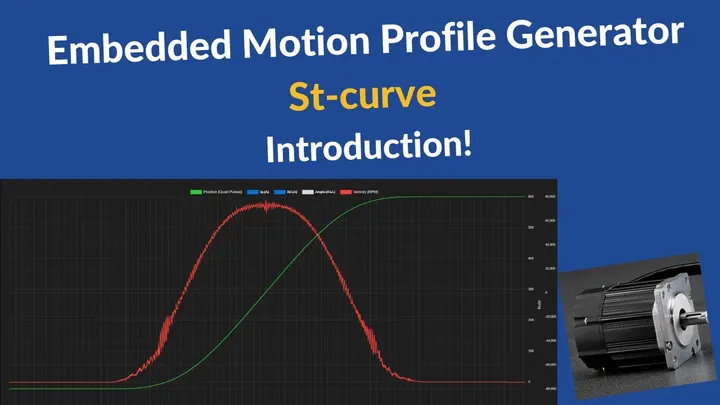
Introduction
A step change in acceleration creates near-infinite jerk, and that jerk is what shakes your machine. It shows up as vibration, belt and bearing wear, audible noise, and overshoot at the end of a move. An S-curve motion profile, which SOLO calls an St-curve, rounds those corners so acceleration ramps up instead of jumping. The result is a smoother move that loads the mechanics gently.
This guide shows you how to design a low-jerk St-curve profile on SOLO, and how to pick between the engine’s two modes: time-based and time-optimal. The short version: time-based fixes how long the move takes, time-optimal fixes the limits and finds the fastest move inside them.
What a Motion Profile Is
A motion profile is the reference trajectory the controller follows over time. It is the plan for the move: where the axis should be at each instant, how fast it should travel, how hard it should accelerate, and how sharply that acceleration is allowed to change. The motor then tracks this plan as closely as the loop allows.
It helps to separate two ideas that people often mix up. The profile decides what the motor should do over time. The tuning decides how well the control loop follows that plan. This article is about profile design. Loop tuning, the gains that make the axis track the reference tightly, is a separate topic. For the wider context on commanding torque, speed, and position, see torque, speed and position control.
Takeaway: the profile is the trajectory you ask for, not how tightly the loop holds it.
Trapezoidal vs S-Curve (Why Jerk Matters)
A trapezoidal profile uses constant acceleration. Velocity ramps up in a straight line, holds flat, then ramps down. The problem sits at the corners. Acceleration jumps from zero to its full value in an instant, so jerk, the rate of change of acceleration, spikes very high at every transition.
An St-curve profile smooths those transitions. Instead of switching acceleration on like a step, it ramps acceleration up and back down with a controlled slope. That bounds the jerk to a value you set. The payoff is real: less vibration, less mechanical stress, lower noise, and smaller position overshoot at the end of the move. The cost is a small amount of extra time, because the rounded ramps are gentler than a hard step.
For most servo machines the trade is worth it. A belt-driven axis or a long arm settles faster and lasts longer once you stop hitting it with jerk spikes.
Takeaway: trapezoidal is simple but jerky, St-curve trades a little time for a much smoother move.
The Four Layers: Position, Velocity, Acceleration, Jerk
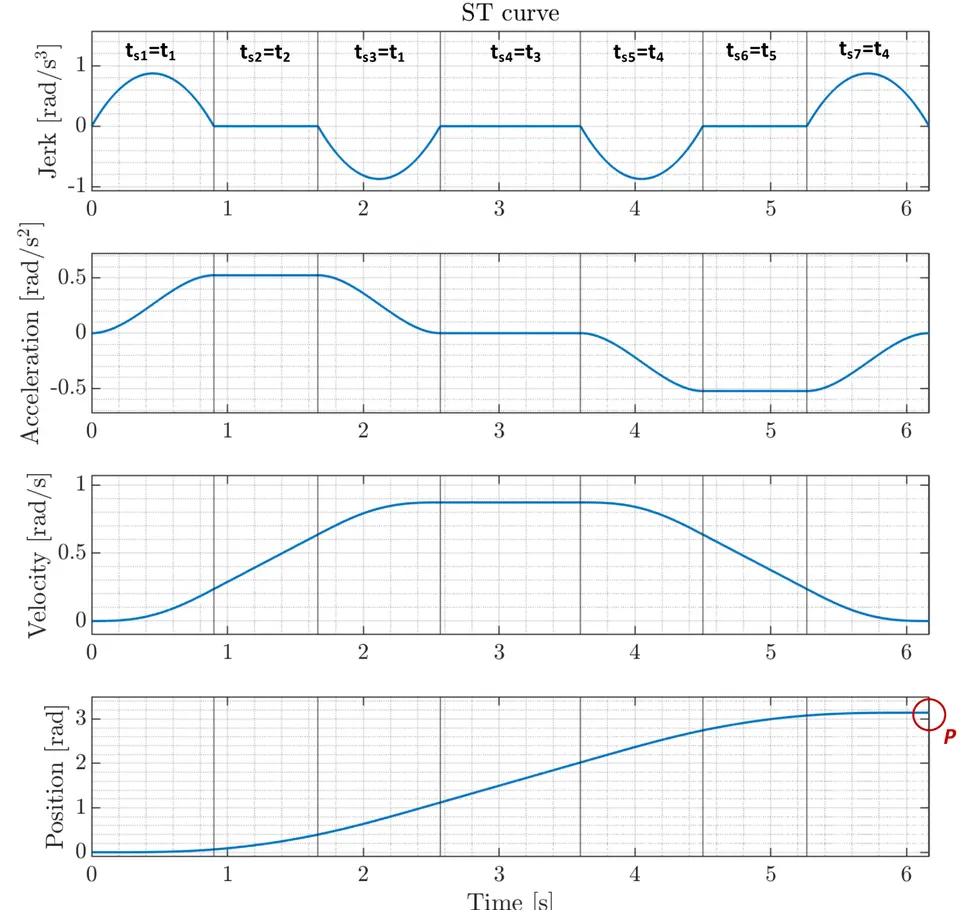
A motion profile is a chain of derivatives. Each layer is the rate of change of the one above it.
| Layer | What it describes | Its effect on the machine |
|---|---|---|
| Position | Where the axis is | The target you want to reach |
| Velocity | How fast it moves | Sets cycle time and throughput |
| Acceleration | How fast velocity changes | Sets the peak torque demand |
| Jerk | How fast acceleration changes | Sets vibration and mechanical stress |
Jerk is the lever for smoothness. When you limit jerk, acceleration can no longer jump, so the whole move becomes gentler on the mechanics. A classic St-curve move splits into seven segments across the acceleration and deceleration phases. You set the limits, and the engine builds those segments for you.
Takeaway: control jerk and you control how smooth or how aggressive the whole profile feels.
Pros, Cons & Trade-offs
An St-curve profile is not free. It is a deliberate trade of a little speed for a lot of smoothness. Here is the balanced view.
| Trapezoidal | St-curve (S-curve) | |
|---|---|---|
| Smoothness | Jerk spikes at corners | Bounded, controlled jerk |
| Vibration and noise | Higher | Lower |
| Mechanical stress | Higher on belts and bearings | Lower |
| Settling and overshoot | More overshoot at the end | Settles cleaner |
| Move time | Slightly shorter for the same limits | Slightly longer for the same limits |
| Setup | Fewer parameters | One more limit to set (jerk) |
The honest trade-off is time versus stress. For the same acceleration limit, a trapezoidal move finishes a touch sooner, because it accelerates harder at the corners. An St-curve move spreads that change out, so it takes a little longer but treats the machine far better. As a rule, the smoother profile pays off on any axis with belts, gears, long arms, or a payload that must not wobble. On a short, rigid, low-speed axis the difference may be small enough to ignore.
Takeaway: pick St-curve when smoothness, wear, or settling matter, and accept a small time penalty for it.
The SOLO St-Curve Motion Profile Engine
SOLO controllers generate the St-curve trajectory on board. The profile is computed inside the controller in real time, so you do not need a host PC streaming setpoints over the bus during the move. You send the target and the limits once, and the controller builds the smooth trajectory itself.
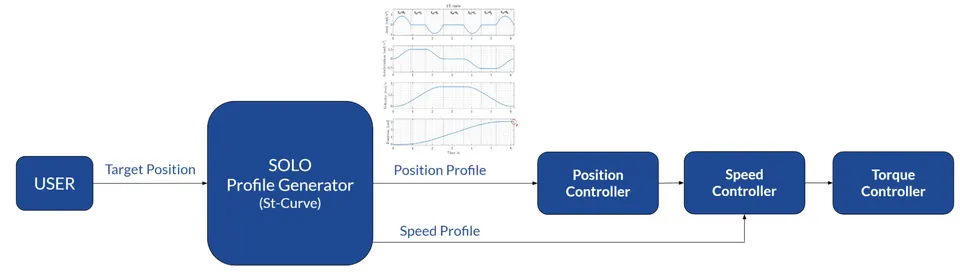
This embedded approach removes a common failure point. When a host computes every point and streams it, any jitter or dropped packet on the link shows up as a rough move. Generating the profile inside the controller keeps the trajectory clean regardless of the host or the network, and your application code only has to issue a move command.
The engine offers two modes: time-based and time-optimal. Both produce a low-jerk St-curve. The difference is what you fix and what the engine solves for. The video walkthrough below shows the embedded St-curve engine in action.
Takeaway: SOLO builds the smooth profile inside the controller, so the move stays clean without a real-time host.
Time-Based St-Curve Profile
In a time-based profile you fix the total time of the move. You tell the engine the target and how long the move should take, and it shapes the St-curve so the axis arrives exactly at that moment. Velocity, acceleration, and jerk are derived to fit the time you set.
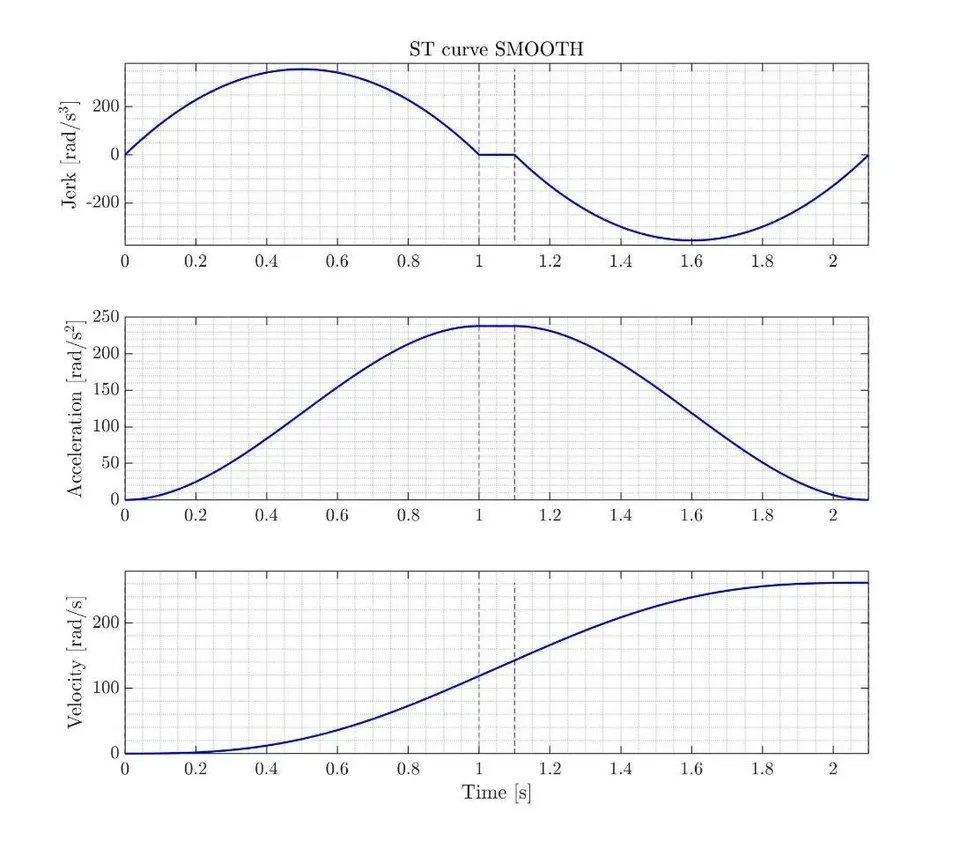
The benefit is deterministic timing. Every move of the same distance takes the same known duration, which makes it easy to coordinate several axes or to hold a fixed line rhythm. The trade-off is that a time-based move usually does not push the motor to its acceleration and jerk limits. You are asking for a specific duration, not the fastest possible move, so there is often unused performance on the table.
When to Choose Time-Based
Choose time-based when timing has to be predictable:
- Multi-axis coordination, where several axes must start and finish together.
- Fixed takt time, where each station on a line gets the same time slot.
- Synchronized moves, where the trajectory must match an external clock or a conveyor.
Takeaway: fix the time when coordination and a steady rhythm matter more than raw speed.
Time-Optimal St-Curve Profile
A time-optimal profile flips the question around. Instead of a duration, you give the engine the limits: maximum velocity, maximum acceleration, maximum deceleration, and maximum jerk. The engine then computes the fastest possible move that never breaks any of those limits.
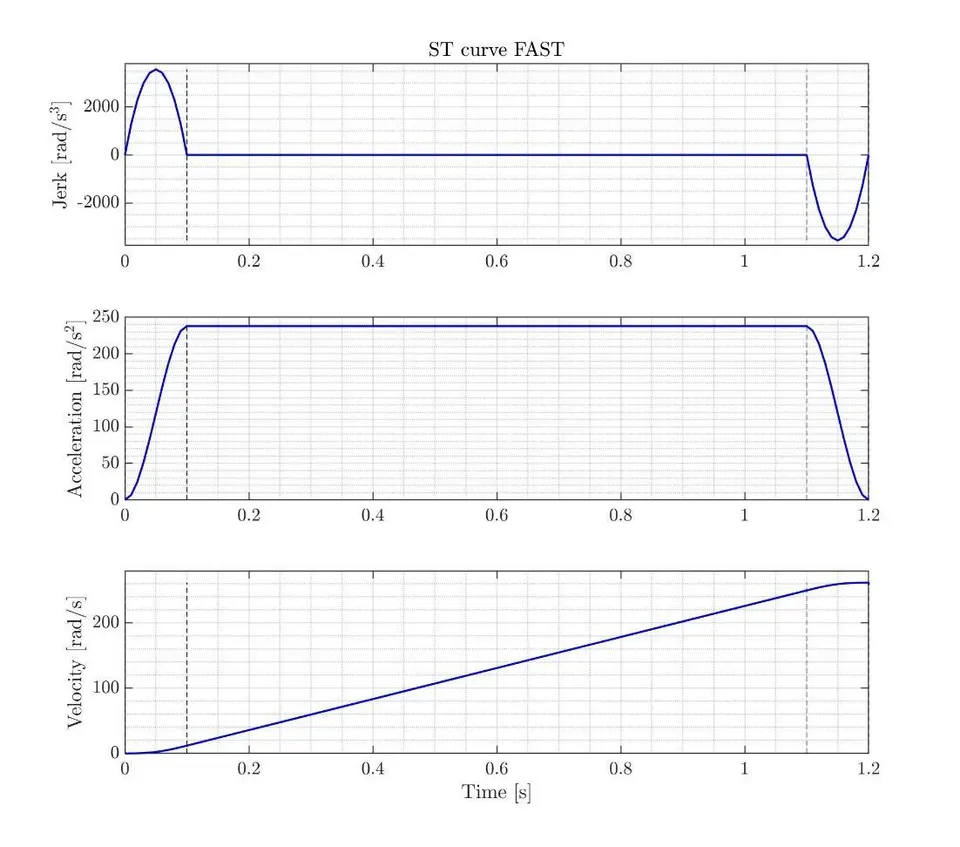
This is the mode for throughput. By riding the limits you set, the axis reaches the target in the shortest time the hardware allows, while still keeping the jerk bounded for a smooth ride. The trade-off is that the move time now changes with the distance. A long move and a short move take different durations, so the timing is not fixed in advance. That is fine when your goal is cycle time rather than synchronization.
When to Choose Time-Optimal
Choose time-optimal when speed is the goal:
- Maximize throughput, getting as many cycles per hour as the hardware allows.
- Minimize cycle time on a single fast axis.
- Point-to-point moves like pick-and-place, where each move should finish as soon as it safely can.
Takeaway: fix the limits when you want the fastest move the machine can deliver.
Time-Based vs Time-Optimal: How to Decide
The choice comes down to one question: do you fix the time, or do you fix the limits?
| Time-based | Time-optimal | |
|---|---|---|
| You set | Total move time | Velocity, acceleration, jerk limits |
| The engine solves for | A profile that fits the time | The fastest move inside the limits |
| Move duration | Fixed and known | Varies with distance |
| Best for | Coordination, fixed takt, sync | Throughput, cycle time, pick-and-place |
| Limits used | Often below the maximum | Pushed to the maximum |
Both modes give you the same smooth, low-jerk St-curve. They differ only in intent. If two axes must arrive together, or the line runs on a fixed beat, fix the time. If a single axis just needs to finish as fast as it safely can, fix the limits.
Takeaway: fix the time for coordination, fix the limits for speed.
Setting Jerk and Acceleration Constraints
Four parameters shape the St-curve, and they apply in both modes:
- Maximum velocity, the top speed of the move.
- Maximum acceleration, how hard the axis speeds up.
- Maximum deceleration, how hard it slows down.
- Maximum jerk, how fast acceleration is allowed to change, which sets the smoothness.
The practical rule is simple. A lower jerk gives a smoother, quieter move but takes a little longer. A higher jerk is faster but harder on the mechanics. Tie your acceleration limit to the torque you actually have, because acceleration demands torque against the load inertia. Ask for more acceleration than the motor can deliver and the real move falls behind the profile. A heavier load carries more inertia, so it needs either more torque or a gentler acceleration limit.
Deceleration deserves its own thought. During braking the motor can push energy back toward the supply, so the deceleration limit interacts with how that energy is handled. If you brake hard and often, see how SOLO manages regenerative braking so the returning energy has somewhere to go.
Takeaway: match acceleration to available torque and load inertia, and use jerk to dial smoothness against speed.
How to Set a Motion Profile in Motion Terminal
Setting a profile on SOLO follows a clear sequence in Motion Terminal:
- Select the control mode, position or velocity, for the axis you want to move.
- Open the motion profile panel where the St-curve settings live.
- Pick the mode, time-based or time-optimal.
- Enter the values. For time-based, set the total move time. For time-optimal, set the velocity, acceleration, deceleration, and jerk limits.
- Run the move to the target you choose.
- Check the trajectory in the monitor, where you can confirm the move is as smooth as you expect.
One note on what you will see. The profile sets the reference, but how tightly the axis follows it depends on loop tuning. If the recorded trajectory lags or overshoots the commanded profile, that is a tuning matter, handled by the position and speed loop gains, not the profile itself. Keep the two separate when you debug: first confirm the profile is the shape you asked for, then tune the loop to track it.
Takeaway: choose the mode, enter the limits or the time, run the move, and read the monitor to confirm the shape.
Conclusion
A motion profile is the trajectory you ask the motor to follow, and an St-curve profile bounds the jerk so the move stays smooth on the mechanics. SOLO generates that St-curve on the controller itself, in two modes. Use time-based when you need predictable timing and multi-axis coordination, and use time-optimal when you want the fastest move inside your limits. In both cases, set velocity, acceleration, deceleration, and jerk to match the torque and inertia of your real load. To design and verify a profile on your own axis, open the SOLO Motion Terminal and shape the move in a few clicks.
FAQ
What is an S-curve (St-curve) motion profile?
An S-curve, which SOLO calls an St-curve, is a motion profile that ramps acceleration smoothly instead of switching it on in a step. By bounding the jerk, the rate of change of acceleration, it produces a softer move with less vibration and overshoot than a trapezoidal profile.
When should I use a time-based vs a time-optimal profile?
Use a time-based profile when the move must take a known, fixed duration, for example to coordinate several axes or hold a fixed line rhythm. Use a time-optimal profile when you want the fastest move within set velocity, acceleration, and jerk limits, which suits throughput and pick-and-place work.
Does an S-curve profile reduce vibration and mechanical wear?
Generally yes. By limiting jerk, an St-curve avoids the sudden acceleration steps that excite vibration and stress belts, gears, and bearings. The move takes slightly longer than a hard trapezoidal move, but the machine runs quieter and tends to last longer.
What is the difference between motion profile design and PID loop tuning?
Profile design decides the trajectory you want, the shape of the move over time. Loop tuning decides how tightly the control loop follows that trajectory, through gains in the position and speed loops. They are separate steps. First make the profile the right shape, then tune the loop to track it.
Related articles
Speed Acceleration and Deceleration: Smooth Ramps and Regeneration
How to set speed acceleration and deceleration ramps on SOLO for smooth motion, and how the decel ramp ties into regenerative braking.
Stall Detection and Motor Protection Setup on SOLO
Set up stall detection and motor protection on SOLO: configure the stall time, current and fault response to protect your motor from a locked rotor.
PWM Frequency Selection for Low-Inductance Motors
How to choose the PWM switching frequency on SOLO, why low-inductance motors need a higher frequency, and the trade-offs with heat and ripple.
